Autolink
凌阳成芯科技(成都)有限公司Auto & Vehicles
3.1542.00 Reviews
- Version
- 2.0.59
- Installs
- 1.00M
- Age Rating
- Everyone
Screenshots
Our Review of Autolink
 Analysis by Appyee
Choosing a vehicle companion app is less about finding the longest feature list and more about finding the connection that actually suits the way you use your car. I approached Autolink with that in mind: as an Android app designed to bring a vehicle and a phone together, rather than as a general navigation, maintenance, or driving assistant. That distinction matters because it sets a realistic expectation from the start. Its value depends heavily on whether your vehicle’s built-in system is intended to work with it.
The app is free, aimed at Everyone, and belongs to the Auto & Vehicles category. It was developed by 凌阳成芯科技(成都)有限公司, and its current version is 2.0.59. The Android requirement is modest, with support beginning at version 5.0, so compatibility with the phone itself is unlikely to be the main obstacle for most people. The more important question is whether your particular vehicle setup recognizes the app and makes use of the connection.
What I would check before choosing a vehicle-linking app
My first decision criterion is not the interface. It is compatibility. Apps in this category can look similar in a store, yet behave very differently depending on the car’s hardware, dashboard software, cable arrangement, and phone. Autolink is best understood as a bridge between a compatible vehicle system and a mobile device. If your car does not have the matching integration, installing it may not turn a basic dashboard into a connected one.
Before relying on it for a trip, I would test the complete setup while parked. Install the app, connect the phone in the way your vehicle expects, and check whether the dashboard responds. This is a more useful test than simply opening the app at home. A vehicle-linking tool can appear perfectly normal on the phone while offering little practical value until it is connected to the intended in-car equipment.
I would also decide what problem I am trying to solve. If I mainly want directions, a dedicated navigation app may be the better starting point. If I want service reminders or fuel records, a maintenance-focused tool is likely more appropriate. Autolink makes more sense when the goal is to use the phone as part of the vehicle’s own connected experience, keeping attention on the dashboard rather than treating the handset as a separate device.
Another useful criterion is how much setup friction I can tolerate. A phone-to-car connection is more sensitive than an ordinary app because there are two systems involved. The phone must be supported, the vehicle must recognize the connection, and the user must be comfortable repeating the process when something changes. That does not make the app poor, but it does mean I would not choose it for someone who expects every automotive function to work independently from the first tap.
The public response is mixed rather than overwhelmingly enthusiastic. The app holds an average rating of 3.1 from around fourteen thousand ratings, with more than five hundred written reviews. I read that as a reason to be practical: there is enough adoption to make the app worth testing, but not enough consistency to assume that every vehicle and phone combination will behave identically. In this category, a middling rating often reflects compatibility and setup experiences as much as the basic idea of the app.
The everyday situation where it makes the most sense
Imagine leaving for work with the phone already carrying the information you need, but not wanting to handle it once you are on the road. In a compatible car, a vehicle-linking app can make the phone part of the driving environment instead of leaving it loose on the seat or requiring repeated glances down. I would connect it before moving, confirm that the vehicle has recognized the device, and then keep the phone out of reach.
That workflow is more important than any single button. The benefit is not simply that a phone and a car are connected; it is that the connection can reduce the temptation to operate the phone manually while driving. I would treat Autolink as a preparation tool: connect before departure, verify the dashboard response while stationary, and avoid troubleshooting during the journey. If the connection fails, pulling over is the sensible solution rather than repeatedly reconnecting at traffic lights.
There is also a useful distinction between occasional and daily users. Someone who drives a compatible vehicle every day may appreciate having a familiar connection routine. A person who changes cars frequently, uses rental vehicles, or switches between several phones may find the same setup less convenient. The app’s usefulness grows when the vehicle and phone pairing remains stable; it becomes less attractive when the user must constantly adapt to different in-car systems.
Where Autolink earns its place
The strongest part of the app is its focused purpose. It is not trying to be a complete automotive dashboard on the phone. Instead, it concentrates on the relationship between a vehicle and a mobile device. That narrow role can be an advantage because it gives the user a clear reason to install it. I do not have to search through unrelated driving features to understand what the app is meant to do.
Its broad Android support also helps. A minimum requirement of 5.0 means people using older Android phones may still be able to try it, provided the rest of the vehicle connection is compatible. That is a practical strength for households that keep an older phone in the car or do not replace devices frequently. I would still test the actual phone in the actual vehicle, because operating-system eligibility alone does not guarantee a successful in-car connection.
The free price removes one common barrier. I can install it as a compatibility test without committing money before I know whether it fits my car. That makes the app easier to evaluate than a paid vehicle companion tool, especially for someone who has inherited a car with an unfamiliar dashboard system. The sensible approach is to judge it during a real parked setup, not to assume that free automatically means complete or universal.
Another strength is that the app can be considered part of a larger driving workflow rather than a replacement for every other automotive tool. I would use it for the vehicle-phone link and keep separate tools for tasks outside that role. This separation can be cleaner than forcing one app to manage navigation, maintenance, media, diagnostics, and vehicle records all at once.
A less obvious advantage is that it encourages the user to think about the car’s own interface. Many drivers treat the phone as the only important screen, but a connected vehicle changes the balance. When the dashboard is the place where the driver should look, the phone’s role becomes supportive rather than distracting. Autolink is most valuable when it helps that arrangement work smoothly, even if it is not the app doing every visible task.
Small habits that improve the experience
I would keep the first connection simple. Close unnecessary apps, connect while parked, and give the vehicle time to recognize the phone before assuming something is broken. This is not a hidden feature; it is a practical way to separate connection problems from problems caused by trying to do too much at once. Once the setup works, I would repeat the same order each time rather than changing cables, ports, or settings without a plan.
I would also avoid judging the app after a single failed attempt. The useful test is whether the connection can be established consistently across several ordinary drives. If it works only after repeated unplugging and restarting, that is meaningful information about the total cost of using it. A connection that succeeds once but interrupts the routine every morning is not a strong solution, even if the app itself opens without trouble.
For families sharing a car, I would choose one primary phone for the first setup. Testing several phones at once makes it harder to identify which part of the arrangement is responsible for a problem. After the main connection is stable, other users can be tested separately. This is a small but important workflow improvement, especially when the vehicle is expected to serve more than one driver.
I would also treat updates carefully. The current version is 2.0.59, so users should keep an eye on whether a future update changes the connection behavior on their device. When an app sits between a phone and vehicle hardware, an update can affect the experience more noticeably than it would in a simple standalone utility. I would update when appropriate, but I would avoid doing so immediately before an important trip unless I had time to test the setup again.
When a different type of app may fit better
Autolink is not the obvious choice for everyone. If your main need is turn-by-turn guidance, a dedicated navigation application usually offers a clearer purpose and a more familiar workflow. If you are looking for vehicle health information, service history, expense tracking, or fuel logging, a specialized automotive app may be more useful. Those alternatives address a specific task directly, while Autolink is centered on the connection between the car and the phone.
It may also be the wrong choice if your vehicle already provides everything you need through its own system. In that situation, adding another connection layer can create more steps without improving the daily drive. I would not install it merely because it belongs to the Auto & Vehicles category. The app earns its place when it solves a real integration problem, not when the car’s existing setup is already convenient.
People who prefer a completely wireless experience should be especially realistic about their expectations. The app’s purpose involves bringing the vehicle and phone together, but the exact connection experience depends on the compatible equipment around it. I would not assume that installing the app automatically provides wireless access, full dashboard control, or universal support across cars. Those are decisions to make after testing the intended setup, not promises to infer from the app’s name.
There is a similar trade-off for drivers who want one polished app with a large ecosystem. Autolink’s focused design may feel limited beside a broad navigation or vehicle-management platform. On the other hand, a broader alternative may introduce features that have nothing to do with the specific connection your car requires. I would choose breadth when I need many independent driving tools, and choose this app when the vehicle-phone link is the central requirement.
The rating also makes me cautious about recommending it blindly. An average of 3.1 suggests that the experience is not equally smooth for everyone. That does not cancel out the app’s usefulness, but it changes my recommendation from “install it and forget it” to “install it, test it properly, and keep it only if the routine is reliable.” For a driver whose work depends on uninterrupted access every morning, a more established or vehicle-specific alternative may be worth considering if Autolink proves temperamental.
The real cost of switching
Because the app is free, the financial cost of trying it is low. The larger cost is time. You may need to install it, connect the phone, check the vehicle response, repeat the test, and decide whether the result is stable enough for daily use. That is still a reasonable trade when the app may solve a connection problem, but it is not zero effort.
Switching away can also affect routine. If you become accustomed to preparing the phone through Autolink, moving to a navigation app, a vehicle manufacturer’s tool, or the dashboard’s native system may require a new sequence of connections and settings. I would write down what works before changing anything: which phone is used, how it is connected, and what the vehicle displays. That simple record makes it easier to return to the previous setup if the alternative is less convenient.
There is a safety cost to experimenting carelessly. Any comparison should happen while the vehicle is stationary, preferably before a normal driving day begins. I would never troubleshoot the connection while moving, and I would not use a phone in my hand just because the dashboard integration is unreliable. If the app does not provide a dependable routine in the car, the safer decision is to stop using that connection until the problem is understood.
For someone buying a used vehicle, the switching calculation is slightly different. The app may be worth trying because it can reveal whether the existing phone-to-car arrangement is usable without paying for another service. But I would not make the purchase decision based on the app alone. The vehicle’s broader equipment and the condition of its dashboard system matter more than whether one free application happens to connect successfully.
My recommendation for different kinds of drivers
I recommend trying Autolink if you have a compatible vehicle setup and want a straightforward way to bring your Android phone into that environment. It is particularly reasonable for drivers who value a repeatable connection routine, use an older supported phone, or want to test a vehicle-phone integration without paying first. Its focused purpose is easier to appreciate when you already know the car is designed to work with this kind of bridge.
I would recommend it less strongly to someone seeking a complete navigation, maintenance, or diagnostic solution. In those cases, a dedicated app is likely to deliver a more direct answer. I would also tell drivers who change cars or phones often to test carefully, because the convenience of a stable pairing may disappear when the surrounding hardware changes.
My practical verdict is to treat it as a compatibility-dependent tool, not a universal automotive companion. The installation base of over one million suggests that many people have found a reason to try it, but popularity does not remove the need for a vehicle-specific test. The free price makes that test easy, while the mixed rating makes it important to judge the result by consistency rather than by the first successful connection.
After using it, I would ask myself three simple questions: does the vehicle recognize the phone without repeated effort, does the connection remain dependable during ordinary trips, and does it reduce the need to handle the phone? If the answer to all three is yes, Autolink is doing exactly the job I would want from it. If not, a native vehicle system or a more specialized alternative may be the better choice.
Overall, I see this as a useful but conditional app. It is free, accessible to a wide range of Android devices, and clearly aimed at a real need: linking a car and a phone. Its weakness is the same thing that defines it—the experience depends on the surrounding vehicle setup. Choose it when connection is the problem you need to solve, not simply because you want another driving app.
Verdict
Strengths of Autolink
- Mirrors compatible phone content directly on supported car screens.
- Offers convenient access to navigation while driving.
- Can display selected media and communication apps in the vehicle.
- Reduces the need to handle your phone during short trips.
- Useful for drivers with cars lacking built-in smart connectivity.
Limitations of Autolink
- Compatibility depends heavily on the car stereo and phone model.
- Some features may require a wired USB connection.
- Connection issues can occur after phone or vehicle software updates.
- The interface may feel limited compared with Android Auto or CarPlay.
- Using unsupported apps may cause display or functionality problems.
Other Releases by 凌阳成芯科技(成都)有限公司
View All
Autolink Pro
Auto & Vehicles3.4
Similar Picks in This Category
View All
Android Auto
Google LLC4.1

maxim — order a taxi & food
PT. SITO4.7

Штрафы ГИБДД: проверка с фото
Pays LLC – Штрафы ГИБДД4.7

Номерограм – проверка авто
Авто Ассист4.8

Дром Авто
Дром4.9

Frequently Asked Questions
What is Autolink and what can I use it for?
Autolink is a connectivity app designed to help users link a compatible smartphone with a vehicle’s infotainment system. Depending on the car, phone, and supported features, it may provide access to navigation, music, calls, contacts, notifications, and selected apps through the vehicle display. Its exact capabilities can vary by manufacturer, operating system, cable, and vehicle model.
Is Autolink compatible with every Android phone, iPhone, or car?
No. Autolink compatibility depends on the specific version of the app, your phone’s operating system, the vehicle’s infotainment hardware, and sometimes the USB cable or wireless connection standard. Before downloading, check the app listing and your car manufacturer’s documentation. Some vehicles may support only certain phone models, Android versions, iOS versions, or connection methods.
How do I connect my phone to my vehicle using Autolink?
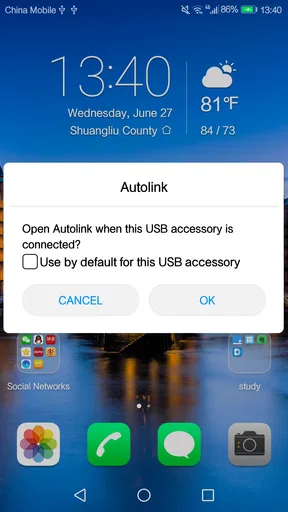
After installing Autolink, enable the requested permissions and connect your phone using the method supported by your vehicle, usually a USB cable or compatible wireless connection. Keep the phone unlocked during the first setup and follow the prompts shown on both screens. If pairing fails, try another cable, restart the infotainment system, and confirm that Bluetooth, Wi-Fi, or USB access is enabled.
What permissions does Autolink require, and is my personal data safe?
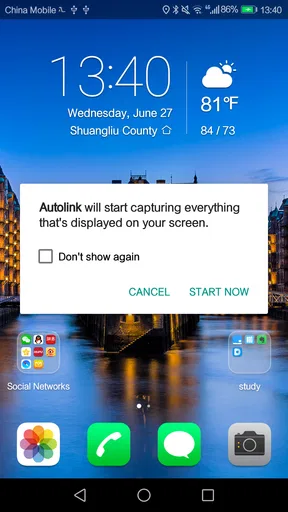
Autolink may request access to contacts, phone calls, notifications, location, media, Bluetooth, Wi-Fi, or USB-related functions so that connected-car features can operate correctly. You should review each permission before accepting it and disable anything you do not need. Avoid using the app while driving, and consult its privacy policy to understand how connection data and personal information are handled.
What should I do if Autolink disconnects or some features do not work?
Connection problems can be caused by an unsupported vehicle, outdated software, a damaged cable, restricted permissions, Bluetooth conflicts, or poor wireless connectivity. Update Autolink and your phone, restart both the handset and car system, reconnect the device, and test with an original or certified cable. If only navigation, calls, or media fails, check the relevant app permissions and vehicle settings.
